
The structure of a document is determined by headings and subheadings. They indicate what the individual parts are about and enable easy navigation in the document. There are five levels of APA headings. Each level of heading is structured differently.
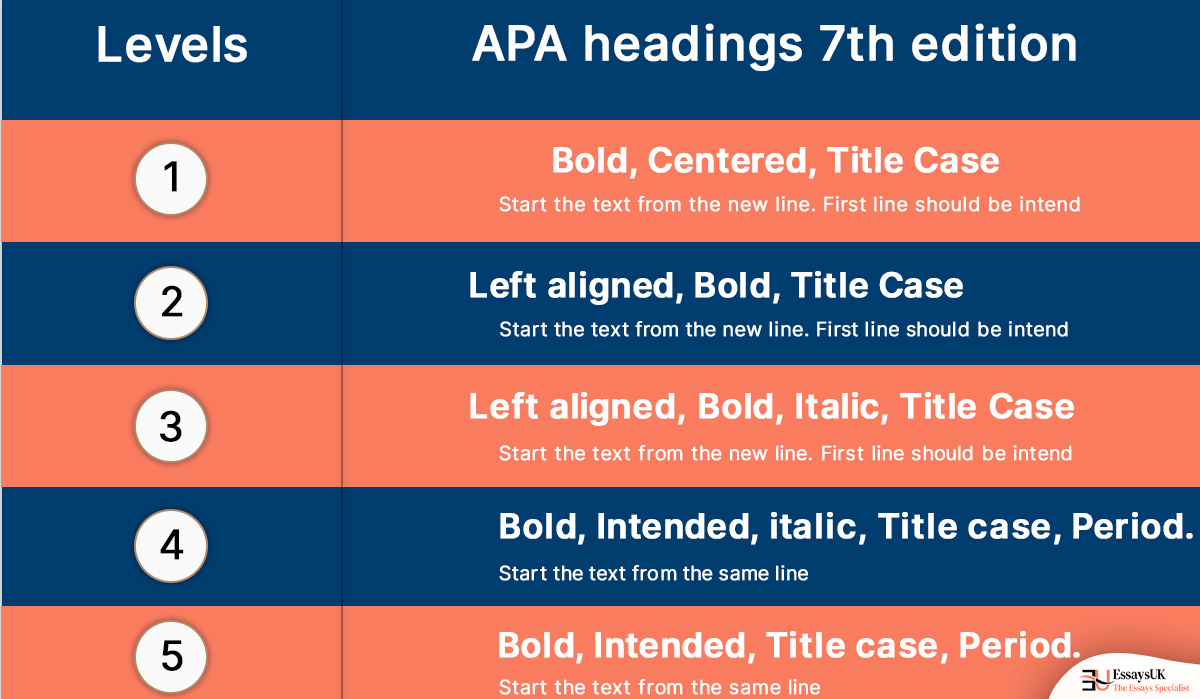
Note: The initial word, terms with four or more letters and all “nouns” should be written in capital letters (nouns, verbs, adjectives, adverbs and pronouns).
In addition to the heading, there are a few other rules to follow:
Note: For lengthy published works, for example thesis, it may be necessary to number the headings. The instructions of your supervisor or university always take precedence over APA rules.
Sometimes, according to the size and intricacy of your paper, you cannot have all five levels of headings. In fact, a shorter piece of writing by a student may not need any headings at all. Likewise, it is fine if certain parts of your page are up to five levels, whilst other parts only utilize level 1 heading.
We make sure our essays are:

For main sections such as “Methods“, “Results” and “Discussion“, heading level 1 is used. Since it is assumed that the first paragraphs are introductory, there is no heading “Introduction” at the beginning of your document. Level 2 headings are used for level 1 subsections. For example, you can include subsections for “Sampling methods” and “Data analysis” under “Methods” (level 1). (level 2). This applies down to heading level 5. At a minimum, use two subheadings or no subheadings at all. It is sufficient to use the top level heading if there is only one subsection.
APA uses “section labels” for certain areas of the document in addition to the normal headings. They are comparable to headings but have a different format. The section labels are written in bold and placed in the center of a separate line on a new page at the top.
The section labels in APA style are;
Rather than formatting every heading separately, you can use Word’s or Google Docs’ “Style Sheets” tool. It allows you to apply styles with a single click. The standard heading formats must be updated to comply with the APA heading requirements if you are using the APA style for the first time. When you use the “Styles” functionality, you may also build a table of contents automatically.
To create a heading in APA referencing style, use a bold font for the main heading (e.g., “Heading”) and title case. For subheadings, use an italicized font (e.g., “Subheading”) and sentence case. Place headings flush left, and do not use underlining or capitalize all words in subheadings.
You May Also Like
All work is written by human writers. 100% AI free, guaranteed.
100% money back guarantee if you find plagiarism in our work.
COMPANY DETAILS